Compare
Compress vs NestUI
Short answer: Pick Compress if you want offline lossless video compression; pick NestUI if you want pay-as-you-go AI media generation. Compress is free; NestUI has a free plan.
 CompressCompress Videos for Free. Forever. Say goodbye to bulky files! Crush video sizes by 90% with no quality loss, even offline. And the best part? It's free!
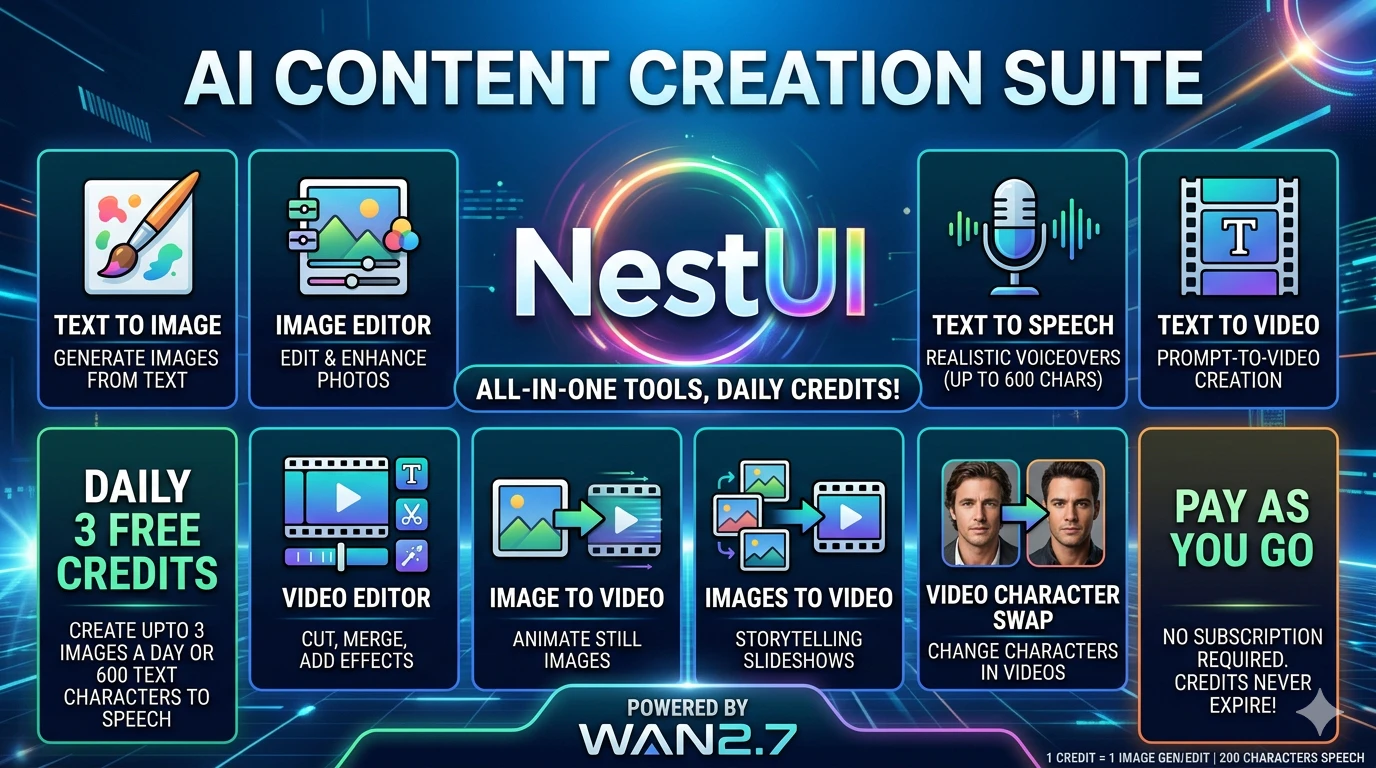 NestUIAll-in-One AI: Video, Image, Audio & Editor Suite
Which to pick
Pick Compress if you want…
- Offline lossless video compression
- A free, open-source tool
- Integrations with MP4 or WebM (on Compress' list, not NestUI's)
Pick NestUI if you want…
- Pay-as-you-go AI media generation
- Integrations with Python SDK or cURL (on NestUI's list, not Compress')
Side by side
- What it is
- Compress:Compress is a free, open-source tool that reduces video file size up to 90% offline with no quality loss.
- NestUI:NestUI is an AI generative suite for video, image, audio creation and editing with pay-as-you-go credits.
- Best for
- Compress:Offline lossless video compression
- NestUI:Pay-as-you-go AI media generation
- Who it’s for
- Compress:Developers and creators who need private, offline video compression.
- NestUI:Creators, filmmakers, game developers, and developers needing AI media generation.
- Pricing
- Compress:Free
- NestUI:Freemium
- Starting price
- Compress:Free
- NestUI:—
- Free plan or trial
- Compress:Free to use
- NestUI:Free trial
- Plans
- Compress:Free Forever $0 per month
- NestUI:—
- Open source
- Compress:Yes, 381 GitHub stars
- NestUI:—
- Works with
- Compress:MP4, WebM
- NestUI:Python SDK, cURL
Compress features
- Offline Compression. Compress videos locally without an internet connection, keeping data private.
- Lossless Compression. Shrink video size by up to 90% while preserving original image and audio quality.
- Trim Video. Select start and end points to remove unwanted segments automatically.
- Versatile Format Support. Handles popular formats such as MP4 and WebM.
- Unlimited Usage. No limits on file size, conversion minutes, or concurrent files.
- Open-Source & Free. Source code is publicly available, modifiable, and free forever.
NestUI features
- Text to Image. Generate high-resolution images from text prompts for $0.08 per credit.
- Text to Video. Create cinematic video clips from descriptions, billed at 5-6 credits per second.
- Text to Speech. Produce realistic voice audio, 1 credit per 800 characters.
- AI Image Editor. Edit images with AI instructions, 1 credit per edit.
- AI Video Editor. Edit and export video clips, 5 credits per second of output.
- Image to Video. Animate a single static image into video, 6 credits per second.
- Images to Video. Morph between first and last frames with text prompts, 6 credits per second.
- Character Swap. Swap characters in images or videos, flat 7-credit fee for a 5-second clip.
Compress vs NestUI FAQ
What is the difference between Compress and NestUI?+
Compress only reduces video file size, whereas NestUI creates and edits video.
Should I use Compress or NestUI?+
Pick Compress if you want offline lossless video compression, a free, open-source tool or integrations with MP4 or WebM (on Compress' list, not NestUI's). Pick NestUI if you want pay-as-you-go AI media generation or integrations with Python SDK or cURL (on NestUI's list, not Compress').
Is Compress or NestUI free?+
Compress is free. NestUI has a free plan and paid plans.
Is Compress or NestUI open source?+
Compress is open source (pranavp10/video-compress on GitHub, MIT license). DevHunt has no public source repository on record for NestUI.
Do Compress and NestUI integrate with the same tools?+
Their integration lists don't overlap: Compress lists MP4 and WebM; NestUI lists Python SDK and cURL.
On DevHunt
Based on each tool's website and DevHunt data. Details may change; check the official sites.